
How to install the Android app
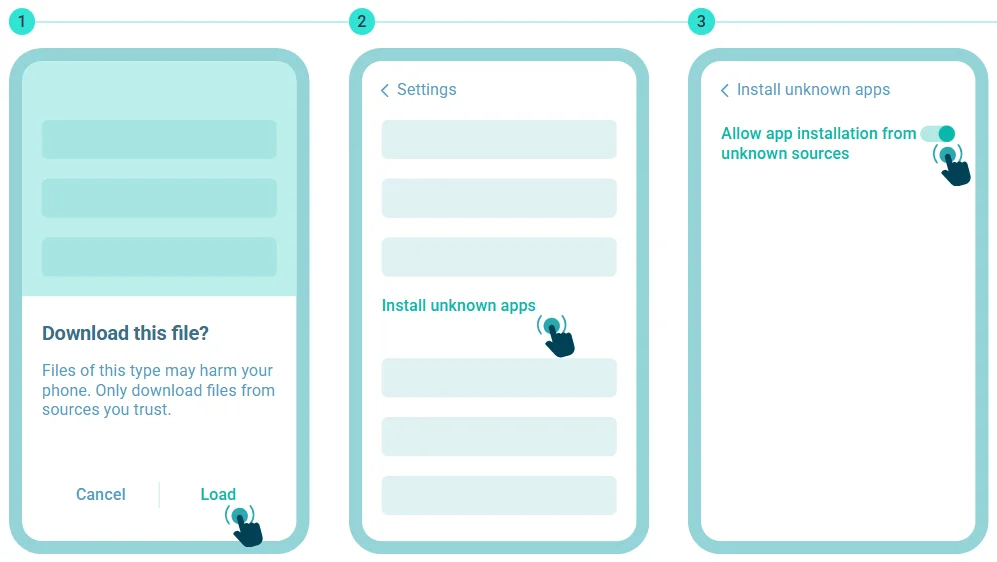
Click "Download" to begin.
Open the "Install unknown apps" section in Settings.
Allow app installation from unknown sources.
Email verification is part of the sign-up process, while some accounts may also require phone verification by SMS. Once the required steps are complete, the account is activated and you can sign in.
This guide explains the complete OnjaBet registration process and what to do if you run into a problem.
How to Register at OnjaBet
Step 1 – Open the Registration Page
Open OnjaBet and select Register or Sign Up.
On desktop, the registration option is available through the main site interface. On mobile, you can access it through the mobile navigation or the dedicated sign-up button.
Selecting it opens the account creation form.
Step 2 – Enter Your Details
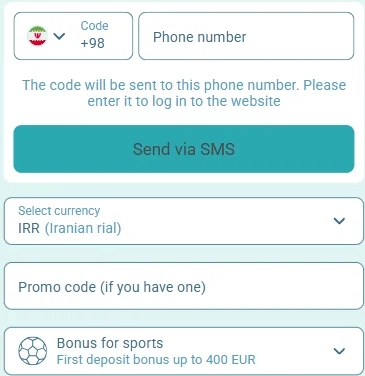
Complete the required registration fields.
The current OnjaBet registration process uses:
- Email address
- Phone number
- Username
- Password
- Preferred account currency
Enter an email address and phone number you can access, as these details may be used during account verification.
Check your information carefully before continuing.
Step 3 – Create a Password
Create a password with at least 8 characters.
The password requirements include uppercase and lowercase letters, numbers and special characters.
Use a unique password that you do not already use for another account. This reduces the risk that a password exposed elsewhere could also affect your OnjaBet account.
Step 4 – Verify Your Details
After submitting the registration form, check the email address you provided.
Open the verification message and follow the link to confirm your email address.
Some accounts may also require phone verification. If that step appears, an SMS code is sent to the registered phone number. Enter the code in the verification field shown by OnjaBet.
The complete sign-up and verification process typically takes around 2–3 minutes when the required messages arrive normally.
Step 5 – Complete Registration
Once the required details are verified, your account is activated.
You can then sign in and begin using the available account features.
Additional profile details can be added after registration. Completing personal information and other account details may also make later account processes easier.
What Information Do You Need to Register?
| Information | Purpose |
|---|---|
| Email address | Account contact and email verification |
| Phone number | Contact information and phone verification when required |
| Username | Account identifier |
| Password | Account access |
| Account currency | Preferred currency for the account |
Use accurate contact details that you can access.
An incorrect email address can prevent you from opening the verification link, while an incorrect phone number can cause problems if SMS verification is requested.
How to Register on Mobile
You can create an OnjaBet account through the mobile version of the website.
Open OnjaBet in your phone browser and select the registration option from the mobile interface. Complete the same required account details and finish the verification steps shown on screen.
You do not need to install the mobile app before creating an account.
After registration, you can install the Android or iPhone version if you prefer app-based access.
How to Register on the OnjaBet Website
Open the OnjaBet website in a desktop or mobile browser and select Register or Sign Up.
Complete the account form, create your password and confirm the required contact information.
Installing the mobile application is not required to register through the web version.
Once the account has been activated, the credentials you created can be used to sign in.
Account Verification
Verification confirms the contact details associated with your OnjaBet account.
Email Verification
After registration, check the inbox of the email address you entered.
Open the OnjaBet verification message and follow the link inside it.
If the email is not visible in your inbox, check your Spam or Junk folder and confirm that you entered the correct address.
Phone Verification
Some accounts may also require phone verification.
When that step is shown, OnjaBet sends a verification code by SMS. Enter the code into the relevant field to continue.
Do not share verification codes with other people.
Identity Information
Identity documents are not described as a required part of the initial account creation form.
Additional personal details or identity information may be requested later for specific account or withdrawal processes.
Follow only the verification steps displayed inside your OnjaBet account.
Completing Your Account Profile
After activation, you can open your profile and review the information associated with your account.
Additional profile fields can include personal information, address details and account settings.
Make sure your email address and phone number are correct and accessible.
If additional information or documentation is requested later, provide it through the appropriate section of your OnjaBet account rather than through unknown third-party pages.
Common OnjaBet Registration Problems
The verification email did not arrive
Check Spam and Junk folders first. Confirm that the email address entered during registration is correct.
If the interface provides a resend option, request the verification message again.
The phone verification code did not arrive
Check the phone number you submitted and make sure your device can receive SMS messages.
If a resend option is available, request another code.
My email is already registered
You may already have an account associated with that email address.
Instead of creating another account, try the OnjaBet Login page and use your existing credentials.
My password is not accepted
Make sure the password meets the current requirements: at least eight characters with uppercase and lowercase letters, numbers and special characters.
The registration page is not loading
Refresh the page and check your internet connection. If necessary, close and reopen the browser before trying again.
Registration cannot be completed
Review each required field and look for an error message next to any incomplete or invalid information.
Correct the highlighted field before submitting the form again.
What to Do After Registration
Sign In to Your Account
Once your account is active, use the credentials created during registration to access it.
Download the App
You can also install OnjaBet on Android or iPhone for mobile access.
Explore Sports Betting
The Sportsbook includes pre-match and Live Betting across football, basketball, tennis and other sports.
Open the Casino
The Casino includes slots, table games, Live Casino and instant games.
Account Security After Registration
Use a unique password and do not share it with other people.
Complete email or phone verification when the relevant step is offered.
OnjaBet also supports optional two-factor authentication. If you enable it, an additional verification code may be required during login or certain account actions.
Never enter your password or verification code on unknown websites or send them to another person.
OnjaBet Registration FAQ
How do I register at OnjaBet?
Open the registration form, provide your email, phone number and username, create a password, select your account currency and complete the required verification.
What information is required?
The current sign-up process uses an email address, phone number, username, password and account currency.
Can I register on mobile?
Yes. The OnjaBet registration page is available through the mobile website.
Is email verification required?
Email verification is part of the current registration process.
Will I need an SMS verification code?
Some accounts may require phone verification by SMS.
How long does registration take?
The standard sign-up and verification process can normally be completed in around 2–3 minutes when there are no delivery or connection delays.
Do I need the app to create an account?
No. You can register through the web version and install the mobile app later.
What happens after registration?
Once your details are verified, the account becomes active and you can sign in.
 Mobile application
Copyright © 2026 «Onjabetapp».