

How to install the Android app
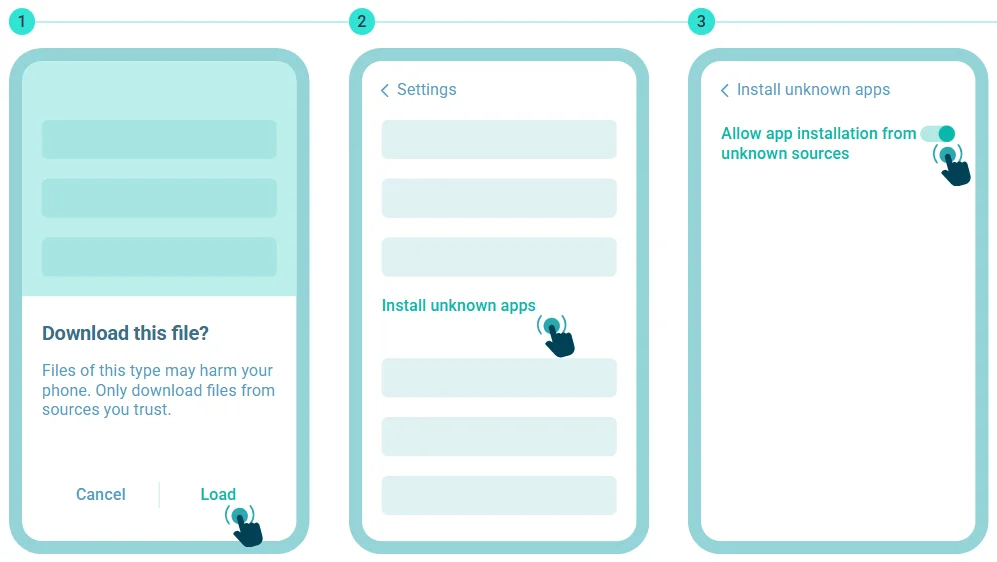
Click "Download" to begin.
Open the "Install unknown apps" section in Settings.
Allow app installation from unknown sources.
Download the OnjaBet mobile app to access your account, sports betting, live markets, casino games and other platform features from your phone. The current version is 256.0.58, last updated on August 19, 2026.
Android users can download the 47 MB APK directly, while iPhone users can install OnjaBet through TestFlight. Below you will find the current app specifications, installation instructions, update information and solutions to common download problems.
Download the OnjaBet App
OnjaBet provides dedicated mobile access for both Android and iPhone users. Choose the version that matches your device and follow the relevant installation process.
For Android, OnjaBet is distributed as an APK file. The current Android package is version 256.0.58 and has a file size of 47 MB.
On iPhone, the app is installed through Apple’s TestFlight platform. You first install TestFlight from the App Store and then use the OnjaBet invitation to install the app.
If OnjaBet is already installed on your Android device, you do not need to uninstall the previous version when an update is released. New updates are offered through the app and can be installed over the existing version.
OnjaBet App for Android
The OnjaBet Android app is available as an APK.
- Current version: 256.0.58
- APK size: 47 MB
- Last update: August 19, 2026
To download it, select the Android download option and wait until the APK has been saved completely to your device. You can then open the file from your Downloads folder and begin installation.
If Android prevents the installation at first, your device may ask you to allow installation from the browser or source that downloaded the APK. The exact setting varies by Android version and phone manufacturer.
When a new OnjaBet version becomes available, there is no need to remove the existing installation. Download and install the available update instead.
OnjaBet App for iPhone and iOS
OnjaBet can be installed on iPhone through TestFlight.
TestFlight is an Apple application used to distribute apps through testing invitations. To install OnjaBet, first open the TestFlight page and choose View in App Store.
Download and install TestFlight, open it and continue through the initial setup. Once the OnjaBet invitation opens in TestFlight, install the app and wait for installation to finish.
After opening OnjaBet, complete the initial prompts and select Start Testing to launch the app.
OnjaBet App Specifications
| Specification | Details |
|---|---|
| App name | OnjaBet |
| Current version | 256.0.58 |
| Last updated | August 19, 2026 |
| Android file size | 47 MB |
| Android file type | APK |
| Platforms | Android and iOS |
| iPhone installation | TestFlight |
| Updates | Available through the app |
How to Download the OnjaBet App
- Choose your operating system: Android or iPhone.
- Select the relevant download option.
- On Android, download the APK file.
- On iPhone, install TestFlight first.
- Complete the installation process for your device.
- Open the OnjaBet app.
- Sign in to your existing account or create a new account if necessary.
Existing users can see the full OnjaBet Login guide.
New users can follow the OnjaBet Registration guide.
How to Install the OnjaBet App
Installing OnjaBet on Android
Once the 47 MB APK has finished downloading, open your Downloads folder and select the OnjaBet file.
If your device blocks the installation, Android may display a prompt asking you to allow apps from the current source. Open the relevant device setting, approve installation for the source you are using and return to the APK.
Select Install and wait until the process is complete. The OnjaBet icon will then appear with your other applications.
You do not need to uninstall an older Android version before updating OnjaBet.
Installing OnjaBet on iPhone
Follow these steps to install OnjaBet through TestFlight:
- Open the TestFlight page and select View in App Store.
- Download TestFlight from the App Store.
- Wait for TestFlight to install and open it.
- Select Continue.
- Allow TestFlight notifications if you want to receive them.
- Install OnjaBet from the TestFlight invitation.
- Wait for OnjaBet to finish installing and open it.
- Select Next when prompted.
- Choose whether to allow OnjaBet notifications.
- Select Start Testing to launch the app.
Once the app opens, you can sign in and access the mobile platform.
OnjaBet App Features
The OnjaBet mobile experience provides access to the platform’s main account and betting features from a smartphone or tablet.
Sports users can browse pre-match events and use Live Betting for supported events. Football, basketball, tennis and many other sports are available through the sports section.
Casino users can access slots, table games, Live Casino and instant games from mobile devices.
Account functions also include deposits, withdrawal requests, customer support and account management. Push notifications can provide updates related to bets, account activity and available offers.
For a detailed look at sports markets, visit OnjaBet Sports Betting.
For casino games and Live Casino, see the OnjaBet Casino page.
Why Use the OnjaBet Mobile App?
The mobile app provides direct access to OnjaBet without having to open a browser and navigate to the website every time.
Its interface is designed for smartphone screens and touch controls, making it easier to move between your account, Sportsbook, Live Betting and Casino sections.
Push notifications can also provide relevant account or betting updates directly on your device.
Updating the Android app is straightforward. When a new version is available, OnjaBet makes the update available through the application and the existing version does not need to be deleted first.
Users who prefer not to install an application can still use the mobile-optimized OnjaBet website through a browser.
OnjaBet App Screenshots and Interface
The OnjaBet mobile interface brings the main areas of the platform into a layout designed for smaller screens.
From the main navigation, users can move between Sports, Live Betting, Casino, account settings and payment-related sections.
The screenshots on this page show the current mobile interface, including the home screen, Sportsbook, live events, Casino, account area and wallet.
Login and Registration in the App
Sign in to your OnjaBet account
Existing OnjaBet users can access their account using their existing credentials.
Create an OnjaBet account
If you have not created an account yet, complete the registration process first.
Sports and Casino in the App
The mobile platform includes both Sportsbook and Casino access.
The Sports section covers pre-match and in-play markets across football, basketball, tennis and other sports.
Explore OnjaBet Sports Betting
The Casino section includes slots, table games, Live Casino and instant games.
Explore OnjaBet Casino
Latest OnjaBet App Version and Updates
The latest confirmed OnjaBet app version is 256.0.58, released on August 19, 2026.
When a new version becomes available, an update is offered through the app. Follow the update prompt and download the new version.
On Android, the previous installation does not need to be removed before updating.
iPhone users receive new TestFlight builds through the TestFlight environment and can install the latest available version from there.
OnjaBet App Download and Installation Problems
Why won’t the OnjaBet APK install?
Make sure the download completed successfully and that your device has enough free storage. Android may also require permission to install an APK from the browser or source you used.
Why won’t the APK open?
A partial or damaged download can prevent the file from opening. The current Android package is version 256.0.58 and approximately 47 MB.
Why isn’t the download completing?
Check your internet connection and available storage. If the download was interrupted, restart it from the OnjaBet download page.
Why won’t the app open?
Close the app completely and open it again. If the problem continues, restart your phone and make sure you are using the latest available version.
How do I update OnjaBet?
When an update is available, follow the notification inside the app and download the new version. Android users do not need to remove the previous installation first.
Why isn’t the download link working?
Check your connection and reload the page. If other parts of the site work normally, retry the OnjaBet download option.
App Security and Genuine Download
Use the OnjaBet download provided on this page or another source that can be clearly connected to the platform.
Unknown APK files distributed through unrelated websites, messaging channels or third-party links may be outdated or modified.
For Android, compare the version and file size before installation. The current package is version 256.0.58 and approximately 47 MB.
For iPhone, OnjaBet is installed through TestFlight.
Avoid entering your account credentials into unknown apps or pages.
Frequently Asked Questions About the OnjaBet App
What is the latest OnjaBet app version?
The current version is 256.0.58, last updated on August 19, 2026.
How do I download OnjaBet for Android?
Choose the Android download option and download the 47 MB APK. Open the file and follow your device’s installation prompts.
Is OnjaBet available for iPhone?
Yes. OnjaBet is installed on iPhone through TestFlight.
How do I install OnjaBet through TestFlight?
Install TestFlight from the App Store, open the OnjaBet invitation, install the app and select Start Testing after the setup is complete.
Do I need to remove the old Android app before updating?
No. A new OnjaBet version can be installed as an update over the existing Android app.
Does the app include Sports Betting?
Yes. The mobile experience includes pre-match and Live Betting markets.
Is Casino available in the app?
Yes. The mobile platform provides access to Casino and Live Casino content.
Can I use my existing account?
Yes. Existing users can sign in with their OnjaBet account.
 Mobile application
Copyright © 2026 «Onjabetapp».